
Registry Key Last Write Time

Windows Registry keys keep a time stamp embedded within them. This cannot easily be seen using regedit.exe, so instead we turn to our trusty Forensic tool kit.

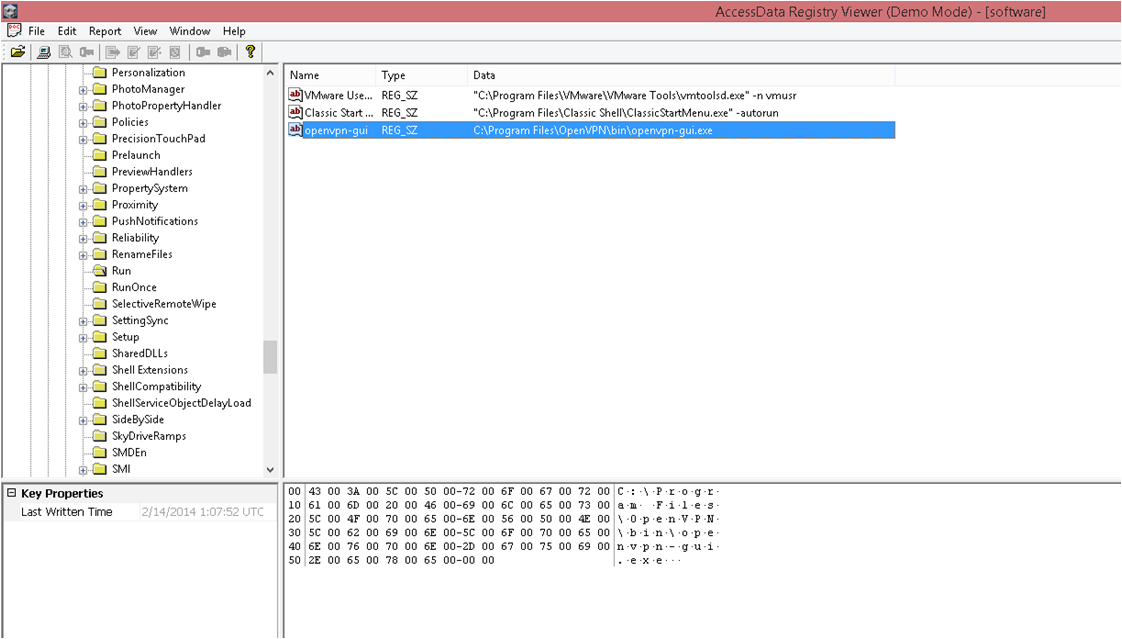
First off I used FTK Imager to capture locked files. This allowed the Hives to be copied and saved into another folder. From there I opened Registry Viewer (both products are made by Access Data, the links are supposed to be the same 🙂  ) and accessed one of the offline Hives saved to the location I specified earlier.
Image

From the screenshot above you can see the Registry viewer is not too dissimilar from regedit.exe. The important part for this post is in the bottom left hand corner. Let me magnify it for you…..

Image

As you can see this was last written to on the 14th Feb 2014 at 01:07am UTC. It is important to know if you are running in UTC or local time as this can cause huge confusion. Running your Forensics VM in UTC is usually helpful. I will show you in a later post how to see what time zone the imaged machine was running in, as well as if DST is active.

With the registry time stamp it is important to remember that it will only show the last time it was written to, it cannot be used alone to create a time line, this will need other artefacts (which will also be covered in later posts).


Posted in Windows Forensics, Windows Registry Forensics | Tagged , | 4 Comments

Security Wizardry

Security Wizardry

An excellent Cyber Information Portal. The Radar page is used by the NSA as seen in the photos on the site.

Posted in Cyber | Tagged | Leave a comment

Windows Registry – The basics

The Windows registry is made up of individual files, known as ‘hives’, these hives contain ‘keys’ (folders) and ‘values’ (data).

There are four root keys:

  • HKEY_CLASSES_ROOT
  • HKEY_CURRENT_USER
  • HKEY_LOCAL_MACHINE
  • HKEY_USERS


It is possible to access the registry while Windows is running using the regedit.exe program or to access the registry files directly with an offline system, forensic image, slave hard drive etc., by accessing the %system32%\config folder for the currently used registry or %system32%\config\regbackup folder which is backed up (by default) every 10 days.

The hive files are as follows:

  • SAM
  • SECURITY
  • SYSTEM
  • SOFTWARE
  • DEFAULT

More data is also held in the user profile under:

Win XP

C:\Documents and Settings\<username>\NTUSER.dat

Windows Vista, Windows 7 and Windows 8

C:\Users\<username>\NTUSER.dat

C:\Users\<username>\AppData\Local\Microsoft\Windows\USRCLASS.dat

The addition of the USRCLASS.dat file with Windows Vista is very useful for forensic investigations; it was created to work with User Access Control (UAC) as such contains information regarding applications which have been executed. It is displayed in the registry viewer under HKEY_CURRENT_USER/Software/Classes.


Posted in Windows Forensics | Tagged , | Leave a comment

Hats Off Security Blog

Welcome to what I hope to be a technical and useful blog, I do tend to go off on tangents quite often, for example my spell checker doesn’t recognise ‘blog’ as a word….. ah well.

This blog will be more along the lines of a technical reference rather than a research blog, although I may do some research. I will be putting notes up which help me to remember things. If these things are useful to you as well then all the better!

A little about me: I work in DFIR and am rather paranoid, as such that’s all you’re getting 🙂

Posted in Introduction | Tagged | Leave a comment